CRL Option Numbers and %Variables – What do they mean?
Wanting to to find a quick way to edit the CRL and AIA fields on a Microsoft Subordinate Certificate Authority?
When editing the content through the registry there are some values that need to be calculated. These values are the numbers that prefix the actual line entry:
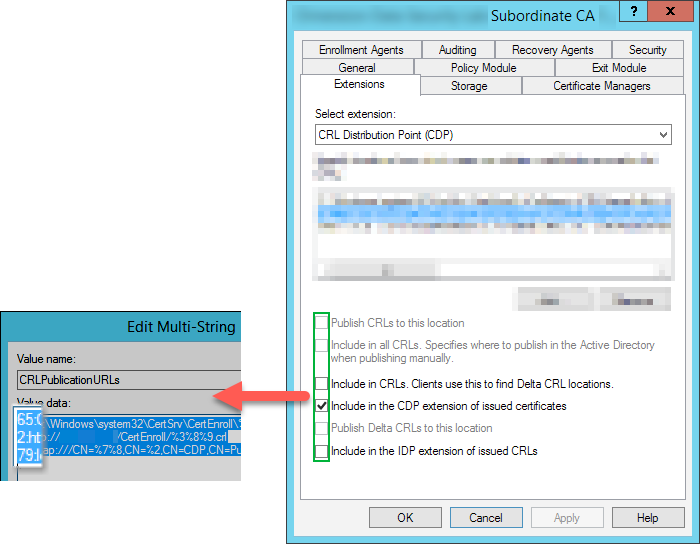
How are these values determined? Well for CRL’s, the values are based off the table below:
| Option Number | Description |
|---|---|
| 0 | No Options Defined |
| 1 | Publish CRLs to this location |
| 2 | Include in CDP extensions of issued certificates |
| 4 | Include in CRLs. Clients use this to find Delta CRL Locations |
| 8 | Include in all CRLs. Specifies where to publish in the Active Directory when publishing manually |
| 64 | Publish Delta CRLs to this location |
| 128 | Include in the IDP extension of issued CRLs |
From our screenshot above and combining the information from the table, we can work out how the values are calculated:
| Value | Description |
|---|---|
| 2 | Include in the CDP extensions of issued certificates |
| 65 | Publish CRLs to this location Publish Delta CRLs to this location |
| 79 | Publish CRLs to this location Include in the CDP extensions of issued certificates Include in CRLS. Clients use this to find Delta CRL Locations Include in all CRLs. Specifies where to publish in the Active Directory when publishing manually. Publish Delta CRLs to this location |
What about the percentage variables such as the ones in the screenshot below?
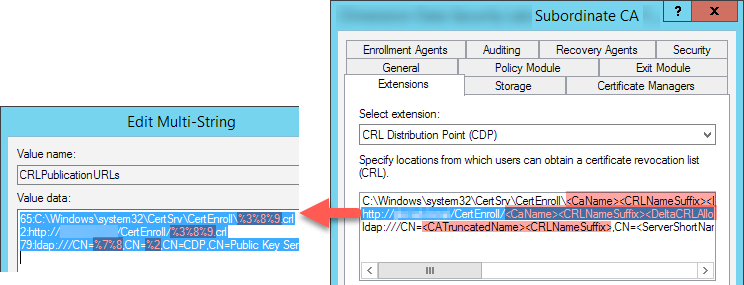
Well this is based off information from this table:
| Variable | Variable Display Name in** **CertSrv MMC | Description |
|---|---|---|
| %1 | <ServerDNSName> | The DNS name of the certification authority server |
| %2 | <ServerShortName> | The NetBIOS name of the certification authority server |
| %3 | <CaName> | The name of the Certificate Authority |
| %4 | <CertificateName> | The renewal extension of the certification authority |
| %6 | <ConfigurationContainer> | The location of the Configuration container in Active Directory |
| %7 | <CATruncatedName> | The “sanitized” name of the certification authority, truncated to 32 characters with a hash on the end |
| %8 | <CRLNameSuffix> | Inserts a name suffix at the end of the file name when publishing a CRL to a file or URL location |
| %9 | <DeltaCRLAllowed> | When a delta CRL is published, this replaces the CRLNameSuffix with a separate suffix to distinguish the delta CRL |
Hope you found this tutorial helpful! Looking for the AIA option numbers and variables? See AIA Option Numbers and %Variables – What do they mean?